 Nieco ponad dwa lata temu kupując mieszkanie w nowo budowanych blokach w Osielsku (mini-osiedle pod nazwą "Willa Tymiankowa") padłem ofiarą nieuczciwego dewelopera - firmy LM Lemar Deweloper z Bydgoszczy. Inwestycja miała ponad 2-letni poślizg z terminem zakończenia, deweloper wpadł w wielomilionowe długi, nie płacił podwykonawcom, księga wieczysta została obciążona przez hipoteki przymusowe na rzecz wierzycieli i całość o mały włos nie zakończyła się upadkiem i utratą mieszkań. Sytuację uratował jeden z wierzycieli, który w zamian za kilkanaście niesprzedanych mieszkań spłacił ówczesne długi oraz kredyty dewelopera. Pozwoliło to oczyścić hipotekę, wyodrębnić mieszkania i podpisać akty notarialne z dotychczasowymi nabywcami lokali. Zmianie uległa nazwa osiedla - z "Willa Tymiankowa" na "Aria Park". Niestety LM Lemar Deweloper pozostawił inwestycję w fatalnym stanie, z dużą ilością niedoróbek i wad, których usunięcie kosztować może nawet 300-400 tys. zł. Nie ma przy tym co liczyć na dewelopera. Cała sytuacja została dokładniej opisana na stronie www.osielsko-tymiankowa.info
Thursday, October 13, 2016
Nieuczciwy deweloper
Nieco ponad dwa lata temu kupując mieszkanie w nowo budowanych blokach w Osielsku (mini-osiedle pod nazwą "Willa Tymiankowa") padłem ofiarą nieuczciwego dewelopera - firmy LM Lemar Deweloper z Bydgoszczy. Inwestycja miała ponad 2-letni poślizg z terminem zakończenia, deweloper wpadł w wielomilionowe długi, nie płacił podwykonawcom, księga wieczysta została obciążona przez hipoteki przymusowe na rzecz wierzycieli i całość o mały włos nie zakończyła się upadkiem i utratą mieszkań. Sytuację uratował jeden z wierzycieli, który w zamian za kilkanaście niesprzedanych mieszkań spłacił ówczesne długi oraz kredyty dewelopera. Pozwoliło to oczyścić hipotekę, wyodrębnić mieszkania i podpisać akty notarialne z dotychczasowymi nabywcami lokali. Zmianie uległa nazwa osiedla - z "Willa Tymiankowa" na "Aria Park". Niestety LM Lemar Deweloper pozostawił inwestycję w fatalnym stanie, z dużą ilością niedoróbek i wad, których usunięcie kosztować może nawet 300-400 tys. zł. Nie ma przy tym co liczyć na dewelopera. Cała sytuacja została dokładniej opisana na stronie www.osielsko-tymiankowa.info

Wednesday, March 9, 2016
QComicBook website is back (kind of)
I've finally managed to sort out the DNS and github-pages stuff and set qcomicbook.org domain so that it's redirected to the QComicBook GitHub project page... That's the first step (and yes, GH pages are quite nice and easy to use) of bringing qcomicbook website back to the living. Now, I still need to think about how to "convert" the old Ruby-on-Rails web site to "static" web pages on GitHub, this will require some re-designing, re-writing and simplification - a good chance to finally learn some of the jQuery and bootstrap stuff maybe?
Monday, November 30, 2015
QComicBook website is going down
QComicBook website is going to be down as I decided not to renew my existing web hosting, due to costs (the donations I received would cover only a fraction of hosting cost). QComicBook will still be available via GitHub repository. I'll also work on migrating qcomicbook website to GitHub webpages (with limitations, as they are not hosting Rails webapps), which will hopefully mean it's going to be available via http://www.qcomicbook.org again soon.
And no, QComicBook is NOT dead. It may look like it is since it hasn't been updated for a very long time, but I promise, I'm not giving up on it! Stay tuned!
And no, QComicBook is NOT dead. It may look like it is since it hasn't been updated for a very long time, but I promise, I'm not giving up on it! Stay tuned!
Thursday, January 31, 2013
My first contribution to Stellarium approved!


My barlow lenses enhancement allows for adding barlow definitions in the Oculars dialog. Just like in the real world, the multiplicity of barlow lens affects focal length of the telescope, and thus increases magnification and decreases field of view. You can of course achieve this by defining additional telescopes with respective focal lengths, but this enhancement makes it easy to play with different telescope - ocular - barlow combinations without much hassle and duplicating telescope definitions. Enjoy.
Saturday, June 9, 2012
The power of built-in debugging and introspection


So, I started hacking it today. For starters I picked the most troublesome widget in QComicBook - ContinuousPageView, responsible for continuous view mode. This widget still has some minor issues that show up under specific circumstances, and they are very hard to debug. I implemented a simple Debug window, available via Debug > Continuous View menu option; it displays frames for all pages, showing their sizes, position on the QGraphicsScene and internal state. And it didn't take long as I spotted first potential problem: when rotation is applied, some sizes manifested by QGraphicsItem interface (blue boxes) don't match numbers used internally to handle continuous view logic; this seems to affect pages that use estimated sizes only (i.e. not loaded yet).
I'm not sure yet if this can cause real problems, but certainly it looks suspicious. It also definitely shows the potential of built-in debugging tools and I'm going to add some more to QComicBook in the future. Frame View mode, job subsystem, memory usage are just a few top candidates for live introspection. Having them at hand, it will hopefully be much easier to prepare a rock solid QComicBook 1.0.0 :)
Tuesday, June 5, 2012
QComicBook UI cleanup, quest for icons

 As a part of the preparations for QComicBook 1.0.0 (yeah, it should eventually come - it's been 7 years already!) I've started working on UI cleanup. The goal is to make it simple and ditch some useless actions (is anyone using Page top/Page bottom or '5 pages forward'??); target #1 is to clean up the toolbar. Another goal is to make QComicBook UI look like the rest of the desktop, i.e. use system theme icons.
Much to my delight I discovered that Qt supports standard desktop icons (be it GNOME, KDE, XFCE...) from version 4.6! This works well and I was able to quickly test it by replacing some icons with themed icons using Qt Designer. Unsurprisingly there are some icons that just don't exist in standard themes. For most menu actions it's OK to just get rid of them, but toolbar actions must have icons... That means 'Two pages mode', 'Manga mode' and 'Fit to width', 'Fit to height' and alike as a minimum (see first screenshot). Unfortunately existing QComicBook icons stand out too much from pretty much any desktop theme and I need to find or create replacements for them. Suggestions, ideas or contributions anyone?
Saturday, June 2, 2012
QComicBook 0.9.0 is available
This release have seen a lot of delays, but it's finally available. It brings two notable internal changes:
- switch to Qt GraphicsView framework, leading to more lightweight and flexible page handling implementation. This opens up more possibilities for future tweaks and enhancements.
- more robust image transformation code resulting in dramatic improvement in responsiveness and performance whenever you scale main window, rotate a page etc; this kind of operations are now performed in a separate thread. If you ever considered QComicBook to be a bit sluggish, give it another chance again and try version 0.9.0!
Monday, May 7, 2012
UDS in Oakland, CA has started
 Ubuntu Developer Summit has just started today at the City Center Marriott in Oakland, CA. OMG! Ubuntu guys seems to be covering the most important aspects of it live.
Sunday, March 11, 2012
Playing with Unity Lens: Manual Pages Lens
 |
| Unity dash - displaying matching man pages as you type |
 |
| Yelp displaying selected man page |
Manual Pages Lens package is available from my PPA. It can only be used in Ubuntu 11.10 at the moment since Ubuntu 12.04 (currently in beta) uses a slightly changed API and I haven't yet ported my lens to it.
By the way, if you don't want to or can't use my lens, you can still open manual pages with Unity dash by hitting ALT+F2 and typing 'man:' followed by a name (e.g. 'man:printf'), and it will bring yelp. Very handy.
Saturday, March 3, 2012
Joining Canonical

Tuesday, January 31, 2012
Goodbye Ireland!
 Early in the January 2011 me and my family moved to Dublin and I took position as a Senior Software Engineer with AOL. This was a big decision for my family for lots of reasons, and not an easy one to undertake as you can imagine. Anyway, everything that has a beginning, has an end, and this time the end was not so distant... In late 2011 we decided to return to Poland for personal and family reasons. So, after 13 months I'm back at home in Poland.
 The decision of returning was almost equally difficult to that of leaving one year ago, and my last days in Ireland will be the most memorable ones - last night & last few pints with friends from AOL, lots of good words I heard from co-workers, last walk in the city centre etc. It's these moments you actually realise you're loosing something and leaving it behind...
Anyway, it's time to move on. Let me try to summarize the last 13 months:
Good things:
- working for AOL was good.
- made a lot of friends at AOL - brilliant people and smart engineers. I'm going to miss you guys!
- learned a lot of new technologies such as Erlang and got familiar with cool stuff such as ZeroMq, Thrift, Goole Protocol Buffers (protobuf), NodeJs and others.
- worked on the backend of one of the biggest Ad-solutions (ADTECH) & learned how advertisement business on the internet works. This was completly new stuff for me.
- Been to PyCon 2011 and listened some amazing talks and lectures from bright people such as Raymond Hettinger or Paul Barry.
- Been to one of Google Techology Group monthly talks at Google HQ in Dublin.
- Had two wonderful weeks of sunny holidays on Tenerfie / Canary Islands (you wouldn't think I was going to say 'in Ireland', would you? ;)) in the summer.
- lived in a quiet and green area of Dublin, in Ashtown (north city), close to Phoenix Park, around 6 kms from cirty centre. Nice area.
- Been to a few cost towns - Malahide, Howth, Dalkey to name a few. Very nice places with beautiful views.
- improved my English - I think my understanding of English has improved, although some Irish people still give me trouble if they're mumbling ;).
- I'm on the lookout for new job again.
- Feeling a bit lost and confused. May take a few weeks to adjust to new (old) reality again ;)
Sunday, December 18, 2011
QComicBook - new web hosting, new domain
After two years with rootnode.net and numerous issues with their hosting I finally made the effort of switching web hosting of QComicBook and my home site. QComicbook web site is now hosted on www.a2hosting.com - by the way if you decide to buy hosting there, please consider using this referrer link which will give me a credit for a2hosting services & renewal of QComicBook hosting.
Other then that, QComicBook web site is now available at much more friendly URL: www.qcomicbook.org. The old URL (qcomicbook.linux-projects.net) is still valid, but I may remove it by the end of 2012, so if you maintain QComicBook packages or link to source tarballs for any other reason, I suggest you update your links with next QComicBook release.
Finally, please be warned that there may be some disruptions to the qcomicbook.linux-projects.net website (and possibly qcomicbook.org) in the next few days due to DNS and configuration changes.
Other then that, QComicBook web site is now available at much more friendly URL: www.qcomicbook.org. The old URL (qcomicbook.linux-projects.net) is still valid, but I may remove it by the end of 2012, so if you maintain QComicBook packages or link to source tarballs for any other reason, I suggest you update your links with next QComicBook release.
Finally, please be warned that there may be some disruptions to the qcomicbook.linux-projects.net website (and possibly qcomicbook.org) in the next few days due to DNS and configuration changes.
Saturday, November 19, 2011
Erlang quick reference card
For the last couple of months I've been learning Erlang and doing some Erlang programming for a new project at work. I couldn't find any good quick reference card for Erlang (aka cheatsheet), so decided to create something on my own. You can download it from my github repository.
As I'm a newbie to Erlang and still learning, I'm sure it has some gaps and possibly errors, so any suggestions and corrections are welcome. Also, the document was created with OpenOffice Writer (plus it's available in PDF format for your convienience), which results in not-so-good look & formatting - my goal was to have something quickly, rather than spending weeks on creating formatting rules in a more suitable tool. My ultimate goal however is to migrate this cheatsheet to TeX (LaTeX) format or similar and find existing macros/rules suitable for quick reference card formating to give it more polished and professional look. If you know any such solutions, please comment.
As I'm a newbie to Erlang and still learning, I'm sure it has some gaps and possibly errors, so any suggestions and corrections are welcome. Also, the document was created with OpenOffice Writer (plus it's available in PDF format for your convienience), which results in not-so-good look & formatting - my goal was to have something quickly, rather than spending weeks on creating formatting rules in a more suitable tool. My ultimate goal however is to migrate this cheatsheet to TeX (LaTeX) format or similar and find existing macros/rules suitable for quick reference card formating to give it more polished and professional look. If you know any such solutions, please comment.
Friday, September 30, 2011
I'm going to PyCon Ireland 2011!
I seldomly do Python programming, but when I do, I absolutely enjoy and love it. So I couldn't miss the opportunity to attend Python Conference in Dublin. PyCon Ireland is organised by Python enthusiasts from Ireland, and will be held here for the 2nd time. The schedule looks pretty interesting, it looks like Oct 8-9 will be very fruitful 2 days!
Sunday, September 11, 2011
Installing latest Flash Player 11rc on Debian Squeeze
Here is a little HOWTO about clean installation of the latest release candidate of Adobe Flash Player 11 on Debian Squeeze. It should also work on Ubuntu and other derivatives of Debian.
The method proposed here uses Debian's Alternatives System which makes it possible to install latest Flash Player in a dedicated directory and switch between it or the default version installed from Debian repository (v10) if needed.
The method proposed here uses Debian's Alternatives System which makes it possible to install latest Flash Player in a dedicated directory and switch between it or the default version installed from Debian repository (v10) if needed.
- Install flashplugin-nonfree (standard Debian repository) or flashplayer-mozilla (debian-miultimedia repository). This will install Flash Player 10.
- Download latest Flash Player for Linux from Adobe.
- Unpack it to /opt/flashplayer-11rc1 (or any other directory of your choice).
- Add entry for Flash Player 11 in the Alternatives System:
sudo update-alternatives --install /usr/lib/mozilla/plugins/flash-mozilla.so flash-mozilla.so /opt/flashplayer-11rc1/libflashplayer.so 0 - Switch between installed Flash Player versions (will launch interactive menu):
sudo update-alternatives --config flash-mozilla.so
Wednesday, August 24, 2011
Stack smashing protector accepted in Arch Linux!
If you visit my blog you may recall I blogged about feature request for enabling stack-smashing protection in Arch Linux. I had created feature request in Arch Linux bug tracker in March 2010. As you can see this initiated some discussions and finally, after almost 1,5 year they decided to go for it! The default compilation flags have been changed to use stack protector and main toolchain packages were recompiled; other packages will follow with new releases. For now the change is in [testing] repo and should become available in [core] in a few weeks.
So, rejoice Arch users! Unfortunately me personally will not benefit from it since I stopped using Arch some time ago - GNOME 3.0 release (which ruined my desktop experience) and power-off issues caused by updates made me look for a more reliable system (which is Debian Squeeze at the moment). I must admit however that I miss Arch a lot, and the acceptance of stack protector reminds me of it...
BTW, Debian still doesn't take advantage of GCC's stack protector, which is a pitty. Fortunately, Debian security team is aware of this and they plan to enable hardening features in Debian Wheezy.
So, rejoice Arch users! Unfortunately me personally will not benefit from it since I stopped using Arch some time ago - GNOME 3.0 release (which ruined my desktop experience) and power-off issues caused by updates made me look for a more reliable system (which is Debian Squeeze at the moment). I must admit however that I miss Arch a lot, and the acceptance of stack protector reminds me of it...
BTW, Debian still doesn't take advantage of GCC's stack protector, which is a pitty. Fortunately, Debian security team is aware of this and they plan to enable hardening features in Debian Wheezy.
Monday, August 1, 2011
Support QComicBook - buy an ad!
QComicBook is a free software that doesn't bring me any profits (well, except for fun of course) - actually it costs me money on web hosting. Here is a new way for you to support QComicBook website & development: if you want to promote your business or a website on QComicBook website, buy a banner for as little as 5-10€ per month (non exclusive banner) or 50-100€/month (exclusive banner - always visible). Get your website advertised, and support opensource at the same time! Please contact me directly for more details.
Friday, July 29, 2011
My dotfiles are on GitHub
Since I wanted to have consistent configuration across all the PCs I work on, I've created a git repo with most crucial dotfiles (such as vim config or openbox files). My dotfiles can be found here.
Wednesday, July 27, 2011
Finding your way in vim
Vim is quite powerful programmer's editor, but has a very steep learning curve and it takes time to configure it properly. In this tutorial I'd like to share my experiences with configuring vim for efficient symbol, buffer and file navigation. In other words, I'm going to focus on finding these things easily in vim and ignore all other configuration aspects. Getting these things right seems to be the most confusing part for a lot of people who can otherwise use vim already. It's also the part that gives a big efficiency boost when programming or just browsing code, especially when it comes to finding symbol definitions quickly.
Preface
This is by no means a definitive guide on the subject. It' just a bunch of things I learned over years when using vim. Vim evolves, new plugins get developed, so the methods I list here may not neccessarily be the best solutions. But they should work and they do the job for me. These methods should work for pretty much every popular programming language, such as C, C++, Java, Python, Ruby etc.
Looking for symbols
A word of caution first: there is no perfect symbol-based navigation for programming languages such as C++ or Java in vim, as vim doesn't perform any syntax analysis of the code. So, for example, it's not possible to go to the right definition of foo->bar() in C++ code if there are multiple definitions of bar() method, because vim has no notion of foo's type.
Tags
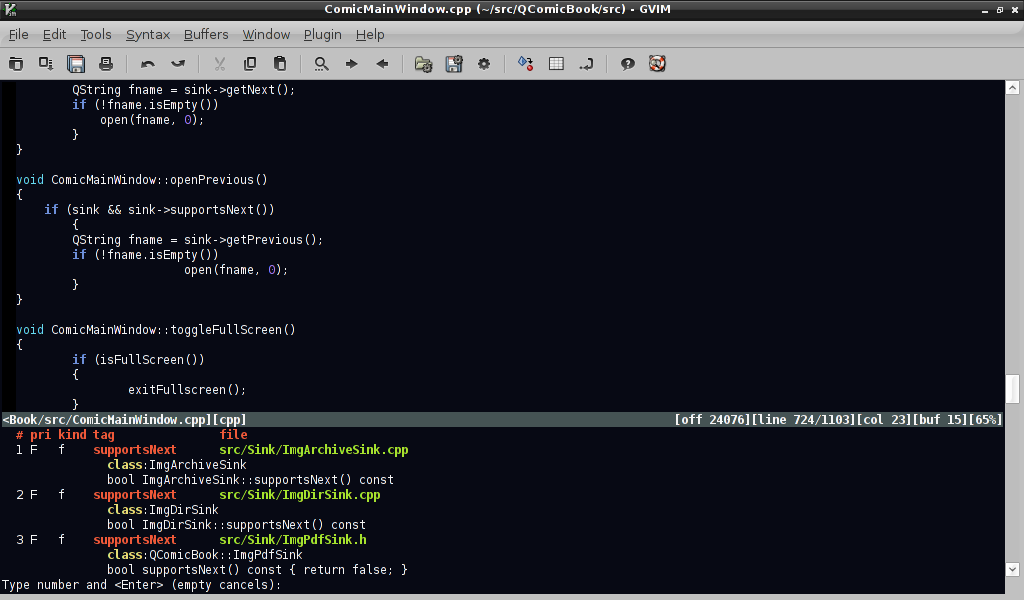 |
| Jumping to tag with g CTRL-] |
Vim has a built-in feature for looking for symbols based on so-called tags file. Tags file needs to be created first with ctags utility, e.g:
$ ctags -R /your/source/code
This will create tags file in your current directory. Add the following line to your .vimrc file to load tags automatically from current working directory as well as from specific path automatically:
:set tags=./tags,/home/user/your/source/code
From now on, you can jump to the first matching symbol definition by pressing CTRL-] over a symbol. CTRL-T will bring you back to where your search started. If there are several matching tags for a symbol (e.g. overloaded methods), you can use :tselect to choose the right one. Even better, if you know in advance there will be multiple matches, press "g CTRL-]" instead of CTRL-] over a keyword to bring the selection list right away. See :help tags for more information on how to use tags effectively.
 |
| Tagbar plugin window |
Tags list
A very useful feature of most IDEs is the list of all classes/methods/symbols for all open files. This can easily be achieved in vim by installing a plugin such as Tagbar or Taglist. Both have similar capabilites, but I tend to like Tagbar more, as it displays tags ordered by their scope and displays method signatures (unlike Taglist, which displays only names).
Cscope-based navigation
Cscope is similiar to ctags, only a bit more powerful since it's capable of searching for functions calling given function etc. To use this capabilities in vim you have to scan you source files with cscope first (e.g. 'cscope -R -b' in your source code directory). Cscope creates a cscope.out file that needs to be loaded in vim by :cscope add /path/to/cscope.out. A common idiom for doing this automatically on vim startup (taken from vim help - see :help cscope) is:
if filereadable("cscope.out")
cs add cscope.out
" else add database pointed to by environment
elseif $CSCOPE_DB != ""
cs add $CSCOPE_DB
endif
Once loaded, cscope symbol database may be queried by issuing :cscope find with a query type and symbol name, e.g. to search for functions calling given function, type:
:cs find c foobar
This is not very convient to type, so you can define mappings for all cscope queries like this:
nmap <C-\>s :cs find s <C-R>=expand("<cword>")<CR><CR>
nmap <C-\>c :cs find c <C-R>=expand("<cword>")<CR><CR>
... and so on.
If you use tags and cscope at the same time, they are independent of each other, use different keyboard shortcuts and need to be queried separately. This can be solved by using :cstag for symbol defintion lookups: cstag searches both databases (by default cscope is searched first). And if you set cscopetag option, i.e.
:set cscopetag
then all tags queries (like CTRL-]) will use :cstag instead, so both databases will be searched.
 |
| Grep search results |
Grep-based searching
Searching for symbols with grep doesn't sound too attractive, but it's actually quite powerful once combined with a handly shortcut key and as long as the symbol you're searching for is not too common.
First off, I highly recommended installing ack-grep, which is a grep-like utility designed specifically for grepping source code files. Then configure vim to use it instead of regular grep - e.g. put this in your .vimrc:
set grepprg=ack-grep\ --cpp\ --cc\ --perl\ --python\ --make
Then define a shortcut key for grep, e.g.
:nmap _g :grep <C-R>=expand("<cword>")<CR><CR>
Pressing _g will grep source code files recursively, starting from the vim's current working directory, for the word under the cursor. Vim places grep results in so called 'quickfix' window, which you can bring up by calling :cwindow. You can navigate through quickfix entries by calling :cnext and :cprev. It's very usefull to map keys for them as well:
:map <F7> :botright cwindow<CR>
:map <F5> :cprev<CR>
:map <F6> :cnext<CR>
If grepping in the current directory is not what you want, then you may want to play with 'expand' macro to grep starting from current file's directory, or from a predefined directory and add new shortcuts for them -- here is how to create a Gvim menu entry for them:
:amenu Devel.Grep\ file\ dir :grep <C-R>=expand(expand("<cword>") . " " . expand("%:h"))<CR><CR>
:amenu Devel.Grep\ source\ dir :grep <C-R>=expand(expand("<cword>") . " " . expand("~/src"))<CR><CR>
Buffer navigation
Standard vim capabilities for navigating to opened files (buffers) are a bit limited when working with large number of files, so installing external plugin(s) is highly recommended. Just for the record, the standard commands for buffer navigation in vim are:
:ls -- shows buffer list
:buffers -- same as above
:bnext -- go to next buffer
:bprev -- go to previous buffer
:[N]b -- edit Nth buffer
There are several plugins that simplify buffer navigation, but I recommend the following: bufexplorer, buffergator and buftabs. Bufexplorer provides a sorted list of all the buffers, which can easily be navigated with cursor keys; pressing ENTER over buffer name makes it active. By default buffers are sorted in MRU (most recently used first) order, but this can easily be changed by pressing 's' in the bufexplorer window. Bufexplorer can be activated by \be, \bv and \bs keyboard shortcuts, but since I use it a lot I prefer a simpler shortcut, e.g. F3 key alone:
:imap <F3> <ESC>:BufExplorer<CR>
:map <F3> :BufExplorer<CR>
Buffergator is similiar, but makes it easy to preview buffers without leaving list of buffers. Upon invocation with \b (or :BuffergatorToggle), a new vertical window with buffers list is opened. CTRL-N, CTRL-P and SPACE keys can be used to navigate the list and preview buffers. ENTER key over buffer name opens it for editing and closes buffer list. One problem buffergator has is its slow response time on invocation: for some reason it takes 1-2 seconds to bring the list of buffers up, whereas it's instantaneous with bufexplorer.
Buftabs is a littler helper addon that is worth installing alongside bufexplorer and/or buffergator. It provides a tabs-like list of buffers displayed in the bottom of the window which is very handy for switch buffers in a circular way, in particular if you map :bprev and :bnext to keys such as CTRL-Left and CTRL-Right:
:noremap <C-left> :bprev<CR>
:noremap <C-right> :bnext<CR>
File navigation
The standard way for finding files is via :Explore [DIR] (or :edit [DIR] and :edit [FILE]). They both support filename completion with TAB key. Explore may be used to find files recursively, if you know only part of a file name, e.g:
:Explore **/*foo*
If you know complete file name, but not its path, you can use vim's built-in find command, e.g:
:find foobar.cpp
This will search for the file in all paths listed in vim's 'path' variable, which is current directory and /usr/include by default. You may want to set to also include subdirectories of your sources directory, for example:
:set path=.,~/src/**,/usr/include,,
Vim's path variable has one more use: it allows for opening files whose name is under or after the cursor. A typical use case is opening an included file in C/C++ source code, by moving over file name in the #include directive, and pressing 'gf' (goto file). Quite handy.
There are plugins which make finding files easier. One of the most useful is NERDTree, which implements a nice filesystem explorer in the form of a tree structure. It's very fast (uses caching), configurable (screen position, list of file patterns to be ignored etc. can be adjusted) and smart (e.g. remembers last cursor position when toggling off and on). It's so useful that its worth having a dedicated keyboard shortut for it, e.g.
:imap <F4> <ESC>:NERDTreeToggle<CR>
:map <F4> :NERDTreeToggle<CR>
Conclusion
The above tips should improve your day-to-day productivity a lot when programming. Go use it, learn it and improve. And let me know in the comments about your ideas and improvements!
Sunday, July 3, 2011
QComicBook 0.8.0 released, brings PDF support
 | |
| QComicBook - reading PDF document |
By the way, if you like QComicBook, you can show your appreciation by making small donation (e.g. a beer worth ;)) - it's really easy with Flattr!
Subscribe to:
Posts (Atom)